💯
Guaranteed Refund
We stand behind the result, so you can buy and refund with confidence.
Professional Cursor refund service. Fully automated, submit in seconds. Guaranteed refund — if it fails, you pay nothing. Zero-risk, worry-free.
Professional, secure, zero-risk refund service
We stand behind the result, so you can buy and refund with confidence.
If the refund fails, you are not charged anything. Zero risk.
Fully automated — done in seconds to tens of seconds, no waiting.
Your token is used only to complete this refund and is discarded right after. Never stored or leaked.
Mature, stable process with automatic retries to maximize success.
Any issue, our support assists you all the way to completion.
Three simple steps
Paste your account token. We auto-detect your plan and show the price.
Pay the exact USDT amount to the BEP20 address. We detect it on-chain automatically.
The refund runs automatically and returns a screenshot of cursor.com showing Free.
Fill in the fields below and submit
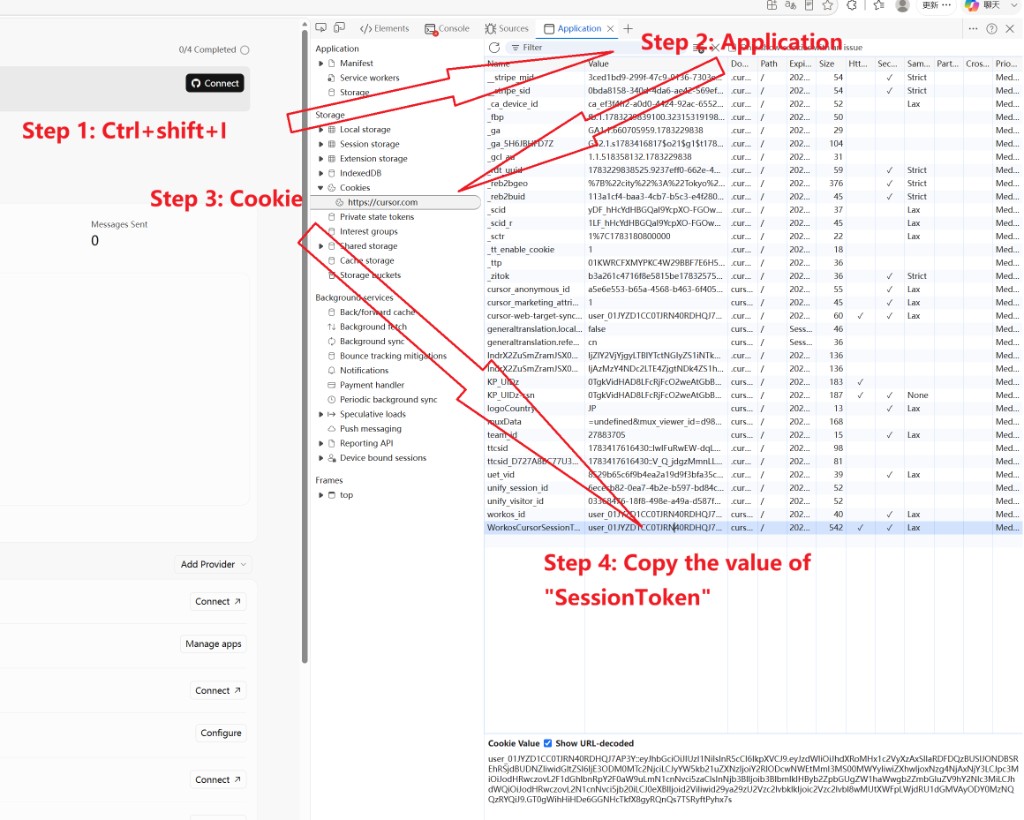
Paste your account token. We detect your plan, show the price, and refund automatically after payment.
Your friends get a discount, and you earn a USDT rebate for each successful referral. Paste your token to get your link and check your rebate.
The refund runs only after your payment is received. If the refund itself fails, contact support and you will be refunded.
Log in to cursor.com, open DevTools → Application → Cookies, copy the value of WorkosCursorSessionToken, and paste it here.
The token is only used to complete this refund and is discarded afterward. It is never stored or used for anything else.
The system shows the reason and an error code, and you are not charged. Screenshot the error code to request a refund on the shopping platform, or retry with a valid token.
Reviews
What users say — leave your comment